Browse Free With Hht 5.0 and the New Remodded Iwp 6.0
This post has been updated from the former one because of complaints received from users about the inefficiency and low speed of the servers and settingsDownload the new HHT from here . . . . it still uses the same user name and pass word http://web-tunnel.com/hht6.0_remmodded32bit.php http://web-tunnel.com/download/WIN_64Bit.zipThis file works for windows vista and 7 better, but does not mean it wont work on XPAre you tired of the overcharging cost of bundle plans from your service providers well this ended today .because here is a very innovative and indispensable tool used to tunnel you browsing optimized for security and speed. . .download the HHT 5.0 from here and then use the following configurations for it. . .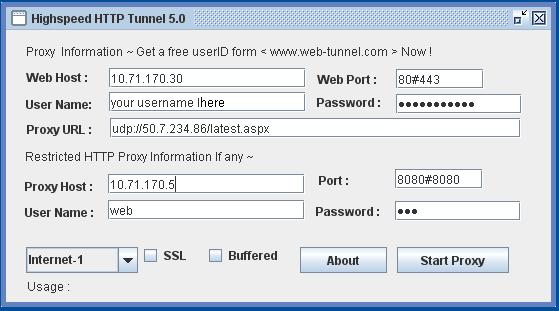 IWP NEw with VPN TUNNELWeb hostProxy urlProxy hostProxy portThis settings are applied to Etisalat Nigeria. . .configuring it for foreign networks will need a little expertise you can call me +2348162049799 for more help . i am telling you, you aint going to be paying so much to browse freely and securely any longer because with this software you are going to rock full speedi will send you a username and password which you can try and if ever you will need an account just call me, with the mobile number +2348166969592 or email at For the free username and password call the number +2348162049799 with you name, email, network you will want to use it with and want to be configured and i will send you details CIAOFor a list of servers try this, with its blazing speed Etisalat Settings-2 :(May Not be Working )=====================================web host –41.233.145.167
web port -8080proxy url: http://freeonlinestudy.info/login.php or udp://50.7.234.82/latest.aspx or http://50.7.234.82/navigate1.aspxproxy host:199.167.145.170
PORT : 80#80ETISALAT WITH FINE SPEEDWeb Host: www.etisalat.com.ng Web Port: 80#443 User Name :You HHT user IDPassword:Your HHT passwordProxy URL : http://199.167.145.167/code.php( Check server list)Proxy Host :10.71.170.5Port :8080#8080Username :webPassword :webMust Select – WAP-1Uncheck SSL
IWP NEw with VPN TUNNELWeb hostProxy urlProxy hostProxy portThis settings are applied to Etisalat Nigeria. . .configuring it for foreign networks will need a little expertise you can call me +2348162049799 for more help . i am telling you, you aint going to be paying so much to browse freely and securely any longer because with this software you are going to rock full speedi will send you a username and password which you can try and if ever you will need an account just call me, with the mobile number +2348166969592 or email at For the free username and password call the number +2348162049799 with you name, email, network you will want to use it with and want to be configured and i will send you details CIAOFor a list of servers try this, with its blazing speed Etisalat Settings-2 :(May Not be Working )=====================================web host –41.233.145.167
web port -8080proxy url: http://freeonlinestudy.info/login.php or udp://50.7.234.82/latest.aspx or http://50.7.234.82/navigate1.aspxproxy host:199.167.145.170
PORT : 80#80ETISALAT WITH FINE SPEEDWeb Host: www.etisalat.com.ng Web Port: 80#443 User Name :You HHT user IDPassword:Your HHT passwordProxy URL : http://199.167.145.167/code.php( Check server list)Proxy Host :10.71.170.5Port :8080#8080Username :webPassword :webMust Select – WAP-1Uncheck SSL
INTERNET-1 NO SSL
Proxifier Must.Please post a comment if this was helpful to youI willl post a new link for the VPN tunnel, use this for nowwindows xp doesnt support IPV4 so it cant run the vpn tunnel only 7 and vista 1> Go To HTTPS Tunnel TAB and run it with as usual etisalat TG settings.Start It.
2> Now Go To VPN Tunnel TABSettings =========
Server : 199.167.145.168 Rport : 500 LPort : 0 Enter HHT user id password.
UN Check Local DNS MTU – 1400
Proto: TCP
CHECK USE PROXY : Enter YourModemIP : 6054 or YourModemIP : 6055 or YourModemIP : 6056 or YourModemIP : 6052 ; ( Whichever is better for you – But 6055 is Best )but first change you mtu to 1400copy and paste on windows command prompttype run on you start menu and type in cmdonce it opens paste the command belownetsh interface ipv4 set subinterface 1 mtu=1400 store=persistentand then exit using the vpn settings above you can use your HHT
always comment if this posts help, we love comments
Continue Reading
The Side Effect of Vibe Coding Nobody Talks About
A subtle shift from AI coding: reading code faster, and why tiny diffs suddenly feel like a slowdown worth unpacking.

From WordPress to Jekyll: Rebuilding My Digital Home
Andrew Miracle chronicles migrating his site from WordPress to Jekyll, and why AI-native workflows fit a digital home...

Vibe Coding and the Death of Knowing What You're Doing
Andrew Miracle on vibe coding, the blurred line between juniors and seniors, and why nobody cares how the spaghetti w...